I . COINBASE
🔥 COINBASE 🔥 is available through Browser, App Android e App IOS.
If you need, you can access the tutorial using the buttons below.😉
⚠️ Use the currency and network indicated in the customer support chat




Of all the forms of payment, cryptocurrency is the best and safest.. You don’t need to have already purchased cryptocurrencies; simply tap the app with the amount you want to send us.  You can use cryptocurrency only to purchase a plan with us if you wish. As it is the safest and most intuitive method, on this page you will find all the help you need to make a Cryptocurrency Payment.
  We created a tutorial to show all the steps in the 2 recommended apps.
These are the most popular intuitive and simple apps to use. In a few minutes you can make the payment with safety and affordable prices.
Se já usa outra app, além das recomendadas, pode utilizar a que preferir desde que possa enviar para a rede e moeda que indicamos 
USDC – Polygon Network
Follow the steps below to make the payment or find the video tutorial below.
To perform cryptocurrency transactions, access “CRYPTOCURRENCY” in the main menu:
 Note that for the correct network to appear, you must have the correct currency selected.
 Avaliable on Browser, App Android e App IOS.
If needed, you can access the tutorial using the buttons below.
Use the currency and network indicated in the customer support chat.
REVOLUT avaliable on Browser, APP ANDROID E APP IOS.
If needed, you can access the tutorial using the button below.
Use the currency and network indicated in the customer support chat.

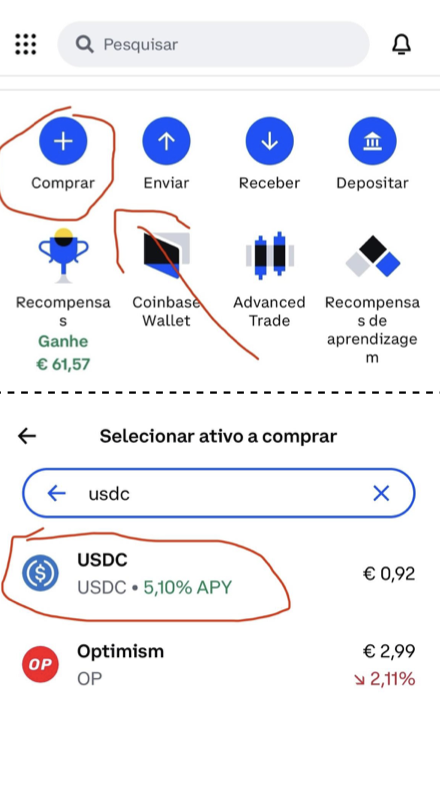
The cryptocurrency we will use is USDC, it is a stable coin pegged to the value of the dollar.
1-Open the app, than just click on Buy button.
2- Than choose USDC coin. You may have to write in the survey.
3.1-You may need to add a payment method such as credit card or ATM if you have never done so.
3.2- Enter the amount to be purchased in €, and complete the necessary steps. USDC is worth less than € so when you buy you will always acquire a higher value of USDC than the value in €.
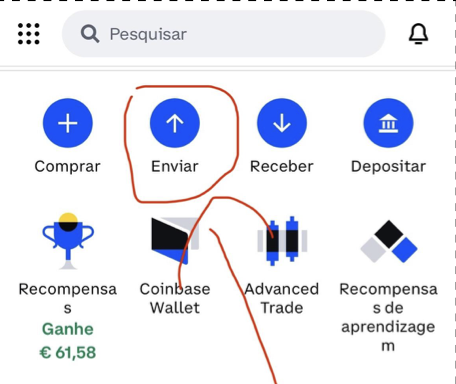
1- To send the USDC, simply click on the send button, as shown in the image to the side.
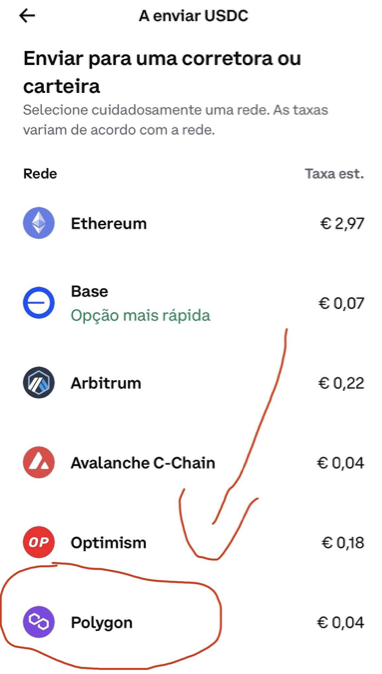
So it is very important to choose the “Polygon” network, as shown in the image. You need to choose the right network otherwise the transfer may not reach the destination
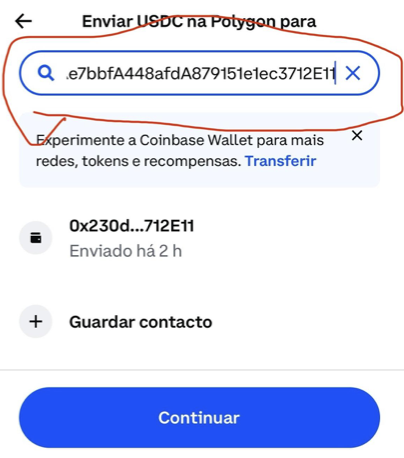
Then enter the address where you will send it, in this case the address of our account, as we can see in the image (the address is the one indicated by chat*)
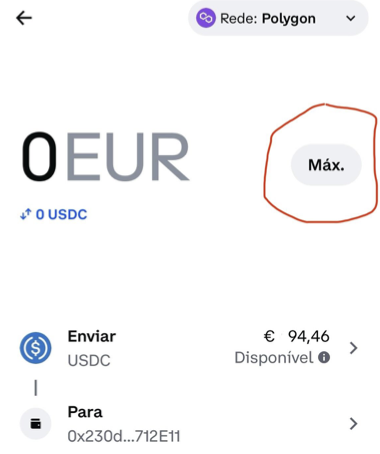
Finally, we include the value. If you only purchased USDC to pay for the service, just press “MAX” or write the amount.